Frontend - Year Filter component in Event page #133

Description

This component is exclusive to the event page. When a user clicks on a specific year, the list will render events relative to that year. This is a React component. Use the current year as default to render a list of events. Use Tailwind css for styling.
If using Material-UI (installed), use CSS for styling
Props: an onChange function to set a new list of events to address the changing state
Features:
- Horizontal list of year buttons in which a user wants to view all events in that year
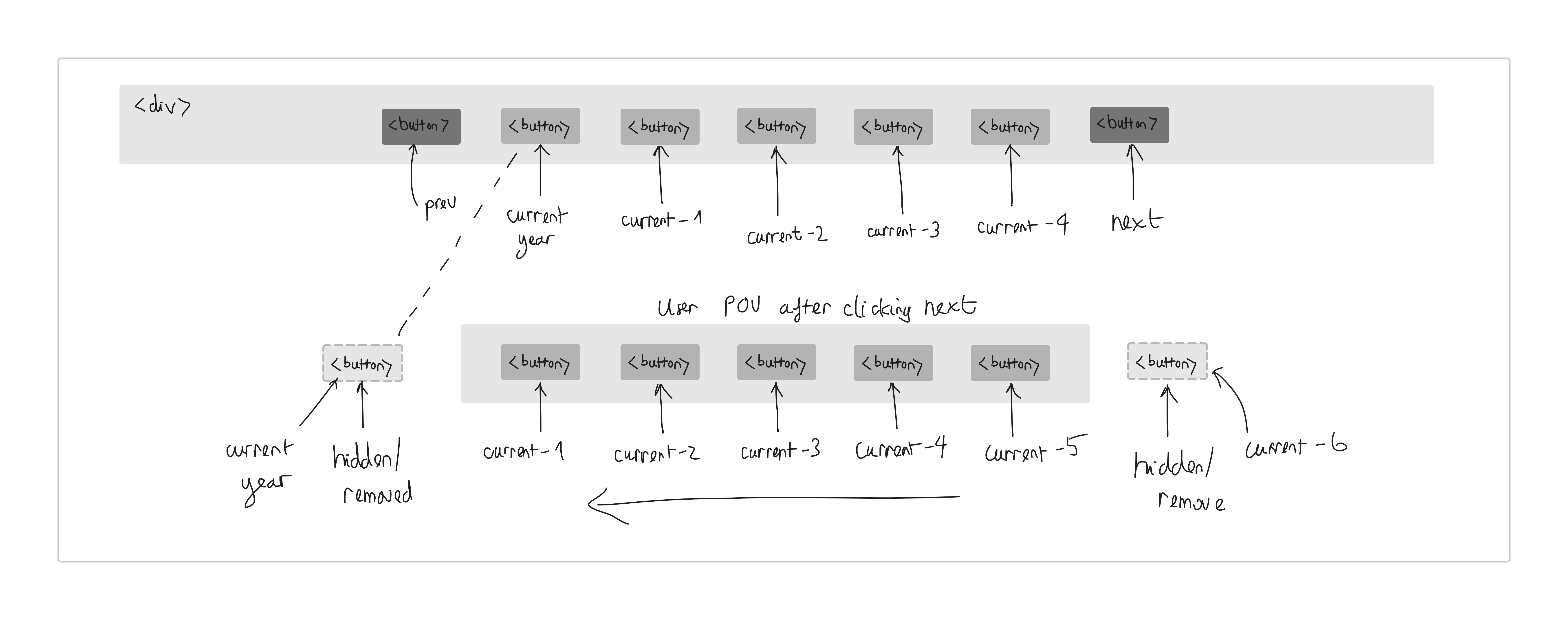
- The filter only shows the most recent five years
- Carousel with next and prev buttons to view past years or current list of years
- When a user clicks the next button, the most left year move to the left, and a new most right year is added from the right.
- Responsive to the smaller screen
Styling detail:
- background-color:
#2A2C2E - button background-color: none
- corner-radius: 5px
- height: 42px
- width: depend on the parent component
- font-size: 16px
- text color: white
- no border:
- on hover: text color
#ff9617 - on hover: border 1px, color:
#ff9617 - prev, next buttons:
- color: white
- size: 16px
- on hover: color
#ff9617 - if there the list cannot move to left or right with prev/next button: set darker white as disabled state (may not have to add)
Demo:

White frame: